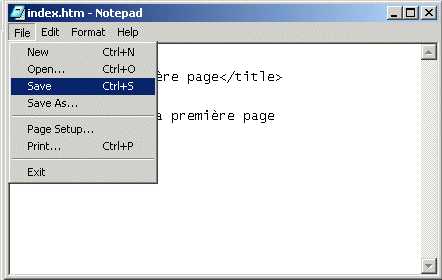
Nous allons a présent éditer la page que l'on vient de créer (pour le moment, elle est vide), pour cela nous avons besoin d'un éditeur de texte comme le bloc-note (
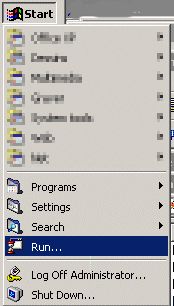
notepad en anglais). Dans le menu Démarrer de windows, vous allez trouver le menu "executer..."
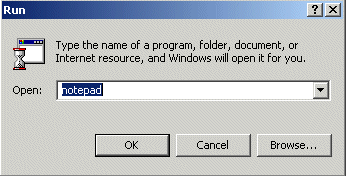
tapez notepad
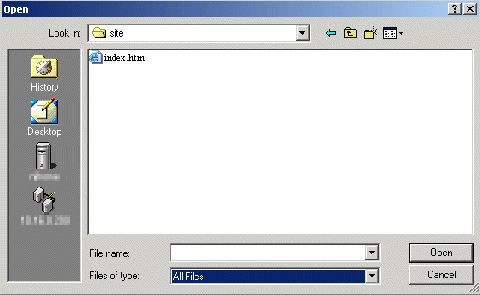
Une fois le notepad ouvert, allez dans le menu fichier, et ouvrez index.htm
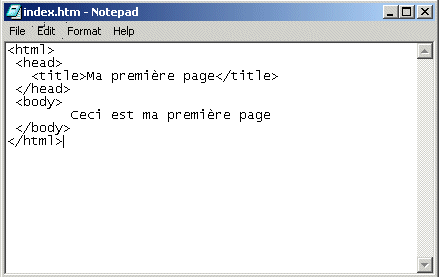
il ne vous reste plus que a saisir le texte ci dessous.
Sauvez.
Pour vérifier que votre page à bien été créée, double-cliquer sur le fichier index.htm. Internet Explorer (ou votre navigateur internet par défaut) va s'ouvrir et vous pourrez voir votre page.
Pour plus d'informations sur le document html et son contenu, rendez vous dans la section
html de ce site pour mieux comprendre le html.
Rendez vous dans la section "
mon premier site pas à pas" pour créer plusieurs pages et des liens entre elles...